An IT manager at a local council opens the Purview dashboard. Sensitivity labels are configured, the DLP policies are on, the compliance reports show green. From here, everything looks under control.
Two streets away, a policy officer pastes a resident's name, BSN, and a draft decision letter into ChatGPT to have the wording cleaned up. ChatGPT is not on the approved list. The browser is Chrome. The laptop is not onboarded to endpoint DLP. Purview records nothing.
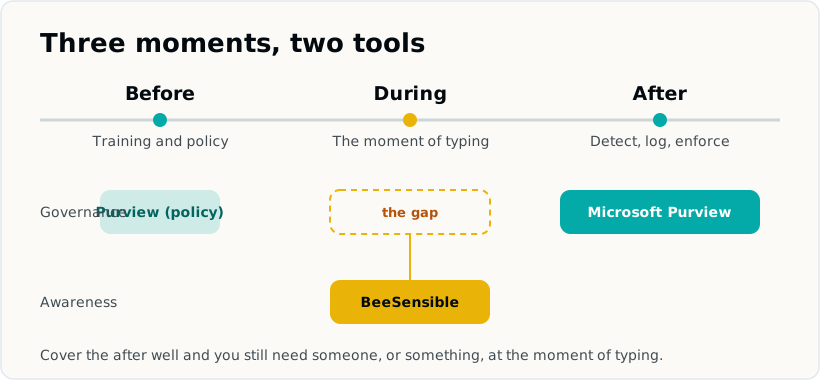
Both people work for the same organisation. Both assume security is handled. The risk simply sat at a different moment: not in the monitoring after the fact, but in the lack of a warning while the text was being typed.
Purview is doing exactly what it is built to do here. This one moment just sits slightly outside its strongest reach.
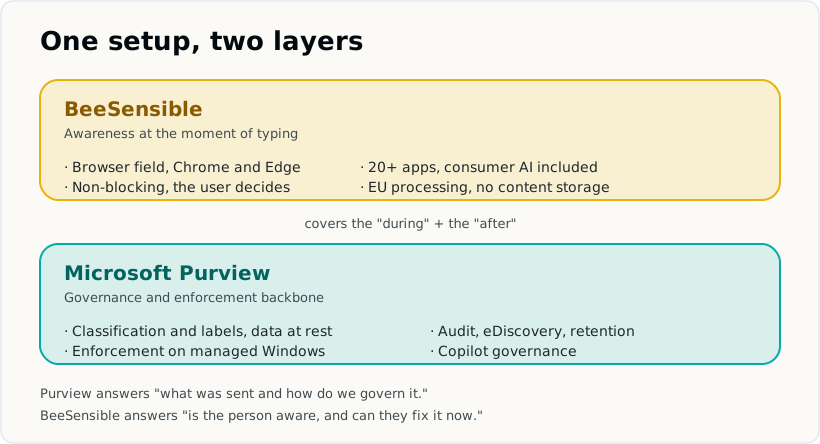
Short answer. Purview governs and audits data across Microsoft 365, and it can warn inline in Microsoft Edge for Business on managed Windows devices. Where it does not reach: ChatGPT or Claude in Chrome, on a phone or an unmanaged laptop, or on a personal account. That gap is where BeeSensible sits. Not a replacement, a second layer.
Two tools, two moments
"Purview or BeeSensible" is the wrong question. They are not two answers to the same problem. They act at different moments in the life of a piece of sensitive data.
Microsoft Purview is Microsoft's data security and compliance suite. It classifies data with sensitivity labels, governs it across Microsoft 365 and Azure, detects risky behaviour, audits activity, and can enforce policy. Purview is strongest once data is stored or sent, and at enforcement inside the Microsoft estate.
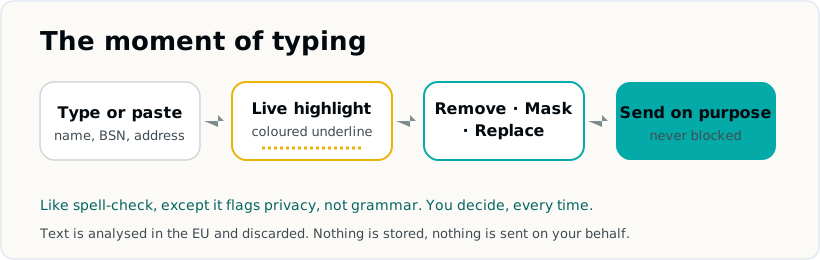
BeeSensible is a browser extension for Chrome and Edge. While you type in a supported web app, it sends the text to a detection service inside the EU, the text is analysed in working memory and discarded, and the sensitive parts get a coloured highlight in the field. You decide what to do next: remove it, replace it with a realistic placeholder, or mask it. The extension never changes text on its own and never blocks sending.
| Microsoft Purview | BeeSensible | |
|---|---|---|
| Where it acts | Across Microsoft 365, Azure, endpoints, and browser (Edge first) | In the browser field, while you type |
| Strongest moment | After data is stored or sent, and at enforcement | At the moment of typing, before you send |
| Primary audience | IT, compliance, security teams | The person writing the prompt or message |
| AI coverage | Copilot, plus other AI sites via Edge or onboarded Windows devices | 18 apps including ChatGPT, Claude, Gemini, Copilot, Perplexity, DeepSeek |
| Browser | Edge for Business inline; Chrome and Firefox via endpoint DLP on Windows | Chrome and Edge, the same on both |
| Data at rest | Classifies and labels documents and email | Not in scope |
| Real-time feedback to the user | Block or warn dialogs where configured | Coloured highlight in the field, user acts |
| Deployment | Multi-month enterprise rollout, device onboarding | Extension install, no device onboarding |
Each tool owns a moment the other does not.
What Microsoft Purview does, and does well
Purview is broad. It brings together data security, data governance, and compliance, with sensitivity labels and classifiers shared across them. (Microsoft Learn)
The parts that matter most for this discussion:
Information Protection. Sensitivity labels classify documents and email, can apply automatically based on content inspection, and can carry encryption and access restrictions with the file wherever it travels inside the estate.
Data Loss Prevention. DLP policies detect sensitive information across Exchange, SharePoint, OneDrive, Teams, endpoints, network, and the browser. Depending on configuration, DLP can warn, block, or report.
Insider Risk Management, Data Lifecycle Management, eDiscovery, Audit, Compliance Manager, and Communication Compliance. This is where Purview is genuinely strong. It can retain and dispose of data on a schedule, run legal discovery across mailboxes and sites, and produce a forensic audit trail. For AI specifically, Purview can log Copilot prompts and responses into the unified audit log, which is something a privacy-by-design awareness tool deliberately does not do.
Data Security Posture Management for AI. Microsoft's DSPM for AI gives central visibility over AI usage, covering Copilot, agents you build, and other AI apps. The newer unified DSPM experience is in preview at the time of writing. (Microsoft Learn: DSPM, Purview protections for Copilot and other AI apps)
If your organisation lives in Microsoft 365, has the licences, and needs governance, audit, and enforcement that hold up in front of a regulator, Purview is the right backbone.
Before or after? Purview can act at the front, with conditions
A common shorthand says Purview only works after the fact. That is not accurate. The difference lives in the detail.
In Microsoft Edge for Business, Purview can act inline. It can warn or block when someone pastes or types sensitive information into a generative AI site, directly in the browser. Microsoft's inline coverage for AI sites started with ChatGPT, Google Gemini, and DeepSeek, and expands over time. (Microsoft Learn: block sharing to AI apps via Edge)
So Purview can protect at the moment of typing. The question is under which conditions.
- The inline AI scenario is built around Microsoft Edge for Business on Intune-managed Windows devices.
- For Chrome and Firefox, Microsoft provides a browser extension, but it extends protection through endpoint DLP and requires devices to be onboarded to Purview. That path is scoped to Windows. (Microsoft Learn: Purview extension for Chrome)
- Endpoint and Teams DLP sit in the E5 tier or the E5 Compliance add-on, above the basic DLP that comes with E3. (Microsoft Purview service description; practitioner breakdown of E3 vs E5 from 2toLead)
This is what enterprise enforcement looks like: managed devices, an onboarding process, and a licence tier that matches the capability. Front-of-the-line coverage therefore depends on browser, device management, and licence. Where those conditions are all met, Purview already does a lot at the moment of typing. Where one of them is not, a gap opens.
The three blind spots that remain
Given those conditions, three gaps tend to stay open in real organisations.
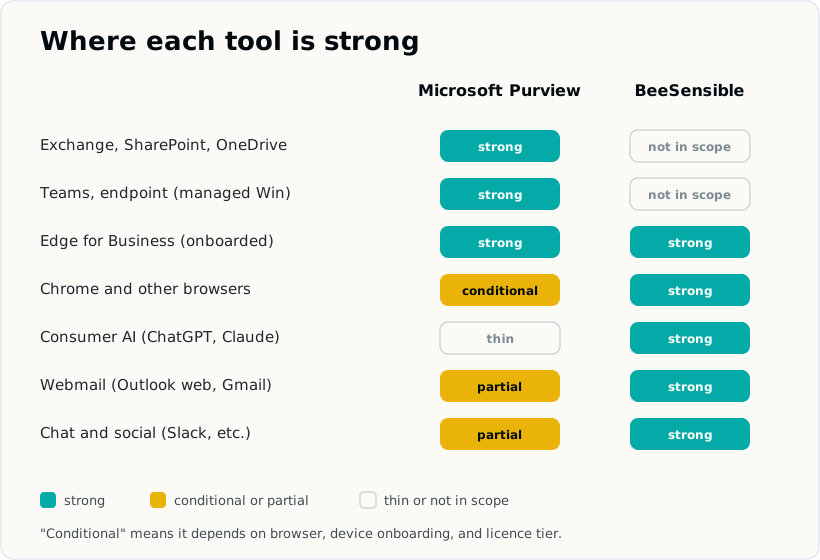
Consumer AI outside the conditions. ChatGPT or Claude in Chrome, on a device that is not onboarded to endpoint DLP, on a tenant without the E5 components. The data goes straight into the field and Purview's inline layer is not in the path.
Shadow AI on unmanaged devices. A personal laptop, a contractor's machine, a phone. Purview can only see what it is positioned to see. New AI tools also appear faster than any approved list is updated. (Why blocking drives Shadow AI)
The human moment. Even with perfect enforcement, the strongest lever is the person pausing before they paste. A block teaches avoidance. A warning that shows what is sensitive, in the field, teaches the habit. That awareness layer is not something a governance suite is designed to deliver.
Find your own gap in three questions
Run these against your own setup, or put them to your Microsoft 365 admin.
- Which browser do people actually use for AI? Purview's inline protection lives in Edge for Business. If Chrome is common, that protection is not in the path.
- Are all devices Intune-onboarded, with Endpoint DLP on the E5 tier? The Chrome and Firefox path needs both. Without them, it does not run.
- Do people use AI on phones or personal laptops? Anything off the managed estate sits outside Purview's reach.
Every "yes, that is us" above is a place where the moment of typing falls outside Purview. That is exactly where a warning in the browser helps.
Where the browser layer fits
BeeSensible does one thing and does it at one moment: it marks sensitive data while you type, in the browser, before you send.
At the moment of typing, across 18 apps. The extension activates on a configured list of web apps: ChatGPT, Claude, Gemini, Microsoft Copilot, Perplexity, DeepSeek, and others, plus email like Outlook on the web and Gmail, chat like Slack and WhatsApp Web, and some social platforms. Someone pasting a BSN into any of them sees a highlight in the field. No policy in the background, no report after the fact, a signal at the moment it matters.
The same in Chrome and Edge. It behaves identically in both browsers, with no device onboarding and no endpoint agent. This is the practical complement to Purview's Edge-first, Windows-scoped inline path.
Non-blocking by design. The person sees the highlight and chooses: remove, replace with a realistic placeholder, or mask. The extension never sends, changes, or blocks the message. The decision stays with the person, which is what builds the habit over time.
On-device or EU processing, no content storage. Through the desktop app, the detection engine runs entirely on the user's machine: no text leaves the device at all. For the browser extension without the desktop app, the text travels to the BeeSensible API hosted on Scaleway in the Netherlands, detection runs on infrastructure at Hetzner in Germany, and the text is processed in working memory and discarded immediately. It is never written to disk, never stored, never used to train any model. All traffic is over TLS, and the hosting runs on ISO 27001 certified EU infrastructure. The detection result is labels and positions only.
A deliberate check for documents, before they go anywhere. Purview's sensitivity labels classify and protect files automatically, in the background, across the Microsoft estate. BeeSensible's desktop app for macOS and Windows works on a different moment: someone deliberately opens a PDF, sees the sensitive fields marked, and exports a clean copy before pasting its contents into an AI tool or sending it on. It is not a scanner watching every attachment, it is a step a person takes on purpose, on the same on-device or EU-processing basis as the browser extension.
 Outlook